Back to Blogs
 3 min read
seo#seo#nextjs#vercel#webdev
From Custom Domain to Vercel Subdomain: How I Recovered My SEO Rankings
ImranParthib
Published on July 24, 2025
When my .me domain expired, I thought my SEO was doomed. Here's how I rebuilt my search presence on a Vercel subdomain and the lessons I learned.
Picture this:
You’ve spent months perfecting your portfolio. Your SEO is dialed in, and your custom domain imranparthib.me is ranking beautifully on Google. Things are looking great, right?
I got that domain thanks to the GitHub Student Developer Pack. You can grab a .me, .tech, or .live domain for free for one year — pretty sweet deal, right?
Then... life happens. And just like that, my domain expired. One minute I was cruising along, and the next — my carefully built online presence vanished from search results.
I suddenly found myself with a new home: imranparthib.vercel.app — and zero SEO authority.
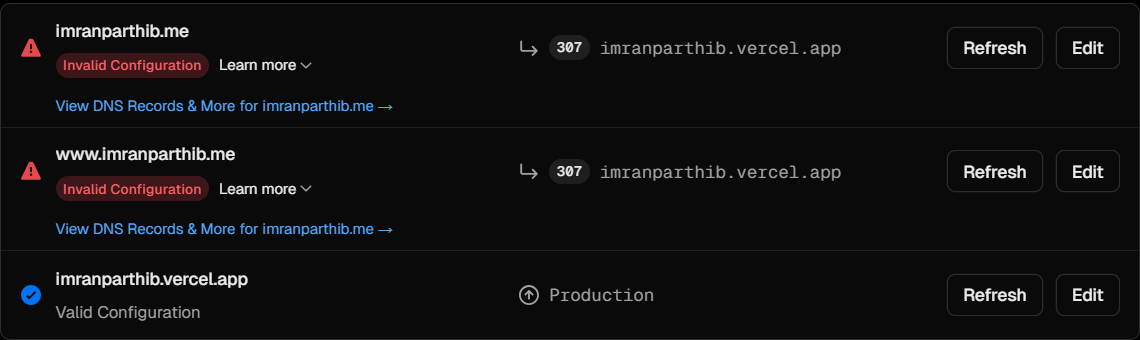
🤞 The Naive Hope
My first thought?
“I’ll just update my metadata.js file, and Google will figure it out.”
Spoiler alert: It wasn’t as simple as I thought... 😅
Weeks went by, and my site was still nowhere to be found on Google.
After digging into it, here’s what I realized: Google saw imranparthib.vercel.app as a completely new website.
That meant Google had to rediscover it, crawl it, and index it from scratch.
Why This Matters for Developers:
-
- Authority Reset: I lost all SEO history and trust signals.
-
- Subdomain Treatment: Google treats subdomains like separate sites, so my new Vercel subdomain started from scratch.
-
- Fresh Start: My site was like a brand new website with zero domain authority.
✅ The Solution: Proper SEO Setup for Vercel Subdomains Here’s what actually worked for me:
- Add Your Site to Google Search Console (The Right Way)
- ✅ Use the URL Prefix method: https://yourname.vercel.app
- ❌ Don’t use the Domain Property method — it doesn’t work for .vercel.app subdomains.
- Verify Using an HTML Meta Tag I used my metadata.js to insert the verification tags:
- Submit Sitemap.xml
-
In Google Search Console:
-
Go to Sitemaps
-
Enter sitemap.xml
-
Click Submit
- Manual Indexing for Key Pages Use the "URL Inspection" tool in GSC:
- /
- /about
- /projects
- /blog
Request indexing manually for each important page.
- Bonus: Bing Webmaster Tools 💡 If you’ve verified with Google Search Console, you can import directly into Bing — no need for extra verification.
📆 Results Timeline Here’s how things played out for me:
Time What Happened ✅ Day 1 Verification successful ✅ Day 2–3 First crawling detected ✅ Week 1–2 Main pages indexed ✅ Week 3–4 Started ranking in Google again 🎉
✅ Vercel Subdomain SEO Checklist
You can copy and use this in your own project README:
- Add site to Google Search Console (URL Prefix method)
- Verify using HTML meta tag
- Submit
sitemap.xml - Request indexing for key pages
- Import into Bing Webmaster Tools
- Optimize metadata with relevant keywords
- Monitor progress via Search Console
- Publish quality content consistently
🧠 Final Thoughts Losing my custom domain felt like a disaster, but it turned into a huge learning experience.
Sure, your domain might change — but your online presence doesn’t have to disappear if you follow the right steps. Vercel subdomains can rank, but it requires patience and the proper setup.
👨💻 About Me I'm Imran Parthib, a React & Next.js developer focused on building performant web applications.
🌐 Portfolio: imranparthib.vercel.app 🐙 GitHub: Imran Parthib 💼 LinkedIn:Imran Parthib
2reactions
0comments
